Bellerophon could never have imagined. The ChimeraWire trojan boosts website popularity by skillfully pretending to be human
Real-time threat news | Hot news | All the news
December 8, 2025
Introduction
Trojan.ChimeraWire allows cybercriminals to simulate user actions and boost the behavioral factor of websites by artificially increasing their rankings in search engine results. For this, the malicious app searches target Internet resources in the Google and Bing search engines and then loads them. It also imitates user actions by clicking links on the loaded sites. The trojan performs all malicious actions in the Google Chrome web browser, which it downloads from a certain domain and then launches it in debug mode over the WebSocket protocol.
Trojan.ChimeraWire gets onto computers with the help of several malicious downloaders. They utilize various privilege escalation techniques based on exploiting DLL Search Order Hijacking vulnerabilities, as well as anti-debugging techniques, in order to avoid detection. Our anti-virus laboratory has tracked at least 2 infection chains involving these malicious programs. In one of them, the malicious script Python.Downloader.208 takes center stage. In the other—the centerpiece is Trojan.DownLoader48.61444, whose operating principle is similar to that of Python.Downloader.208; in fact, this downloader is an alternative to the malicious script.
In this study, we will cover the features of Trojan.ChimeraWire and the malicious apps that deliver it to users’ devices.
First infection chain
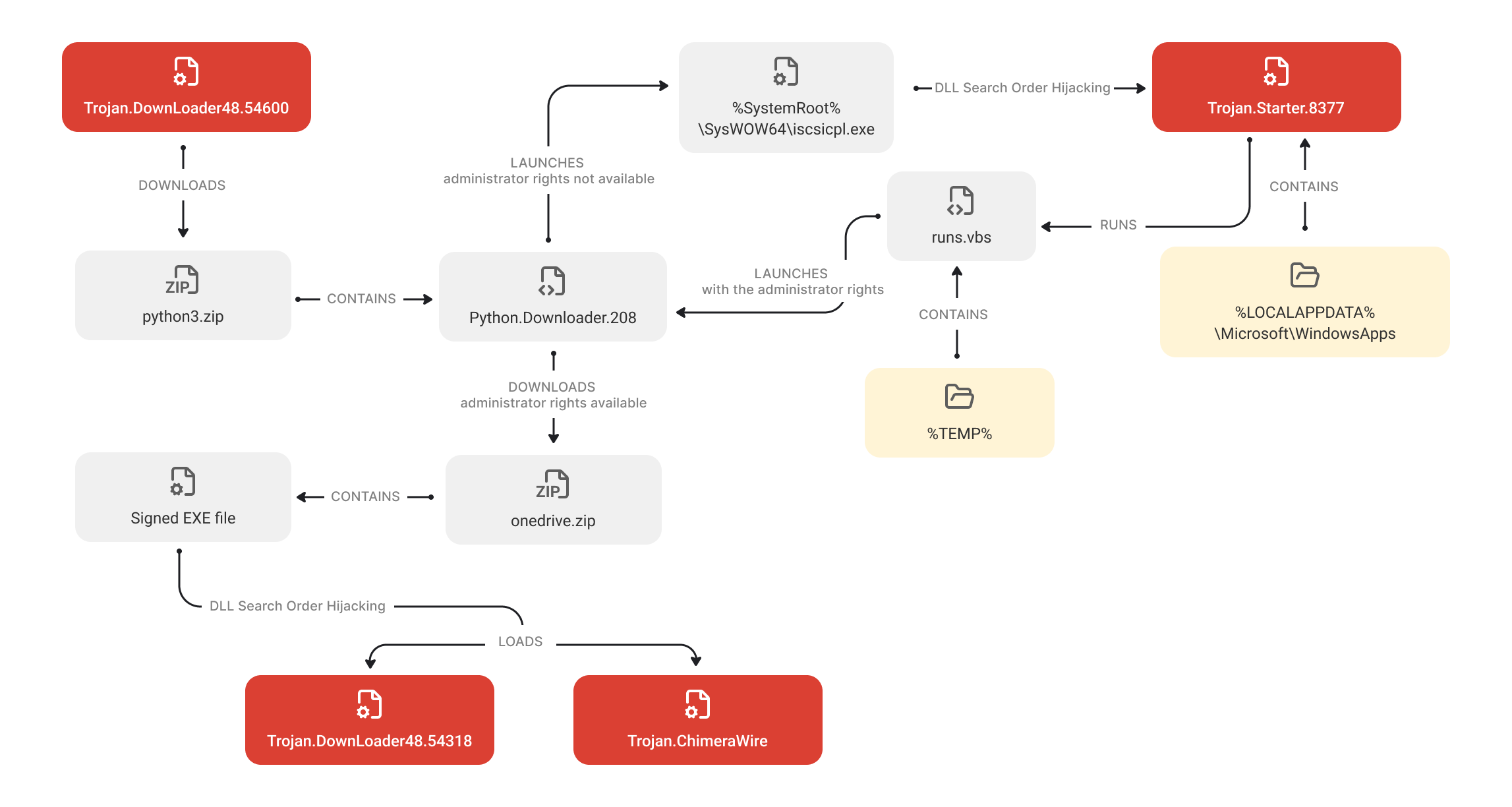
A scheme that illustrates the first infection chain
The first infection chain starts with Trojan.DownLoader48.54600. This malware verifies whether it is operating in an artificial environment and terminates if it detects signs of a virtual machine or the debug mode. If no such signs exist, the trojan downloads the ZIP archive python3.zip from the C2 server. It contains the malicious script Python.Downloader.208 along with some additional files that it needs to operate, e.g., the malicious library ISCSIEXE.dll (Trojan.Starter.8377). Trojan.DownLoader48.54600 extracts the archive and runs the script. The latter is the second infection stage and represents the downloader that receives the next stage from the C2 server.
Python.Downloader.208’s behavior depends on the rights it has when executed. If the script is running without administrator privileges, it tries to obtain them. For this, Trojan.Starter.8377 (extracted along with it) is copied to the directory %LOCALAPPDATA%\Microsoft\WindowsApps. Moreover, a script runs.vbs is created that will later be used to re-launch Python.Downloader.208.
Next, Python.Downloader.208 launches the system app %SystemRoot%\SysWOW64\iscsicpl.exe. Because a DLL Search Order Hijacking class vulnerability is present in it, it automatically loads the trojan library ISCSIEXE.dll, whose name matches the name of a legitimate Windows component.
In turn, Trojan.Starter.8377 runs the VBS script runs.vbs, which then executes Python.Downloader.208 again, but already as administrator.
When executed with the necessary privileges, Python.Downloader.208 downloads the password-protected archive onedrive.zip from the C2 server. It contains the next infection stage, which is the Trojan.DownLoader48.54318 (it comes as the library UpdateRingSettings.dll), and the additional files required for it to operate (for instance, the legitimate app OneDrivePatcher.exe, which is part of the OneDrive software from the Windows OS and has a valid digital signature).
After extracting the archive, Python.Downloader.208 creates a System Scheduler task for running the app OneDrivePatcher.exe at system boot. Next, it launches this program. Because it has a DLL Search Order Hijacking vulnerability, the app automatically loads the malicious library UpdateRingSettings.dll, whose name matches the name of the OneDrive software component.
Once Trojan.DownLoader48.54318 gains control, it checks whether it has launched in an artificial environment. If it detects any sign that it is operating on a virtual machine or in debug mode, it terminates.
If such signs are not detected, the trojan library tries to download the payload from the C2 server as well as the keys for its decryption.
The decrypted payload is a ZLIB container with a shellcode and an executable file. After decrypting the container, Trojan.DownLoader48.54318 tries to unpack it. If it fails to do so, the trojan deletes itself and terminates its active process. If the unpacking is successful, control is handed to the shellcode, whose task is to unzip the executable that comes with it. This file represents the final infection stage, which is the target trojan Trojan.ChimeraWire.
Second infection chain
The second stage starts with the Trojan.DownLoader48.61444 malware. When launched, it verifies whether it has administrator rights and tries to obtain them if they are missing. The trojan uses the Masquerade PEB technique to bypass the security system, disguising itself as a legitimate process explorer.exe.
Next, it patches the copy of the system library %SystemRoot%\System32\ATL.dll. To do so, Trojan.DownLoader48.61444 reads its contents, adds a decrypted bytecode to it along with the path to the trojan’s file, and then saves the modified copy as the file dropper in the same directory where it is located. After that, the trojan initializes the COM model objects of the Windows Shell for the service %SystemRoot%\System32\wbem and the modified library. If this initialization is successful, Trojan.DownLoader48.61444 tries to obtain administrator rights by using the CMSTPLUA COM interface, exploiting a vulnerability that is typical for some old COM interfaces.
If successful, the modified library dropper is copied to the directory %SystemRoot%\System32\wbem as the file ATL.dll. After that, Trojan.DownLoader48.61444 launches the Windows Management Instrumentation WmiMgmt.msc. As a result, a DLL Search Order Hijacking vulnerability is exploited in the system app mmc.exe, and it automatically loads the patched library%SystemRoot%\System32\wbem\ATL.dll. In turn, this library launches the Trojan.DownLoader48.61444 again, but this time—with administrator rights.
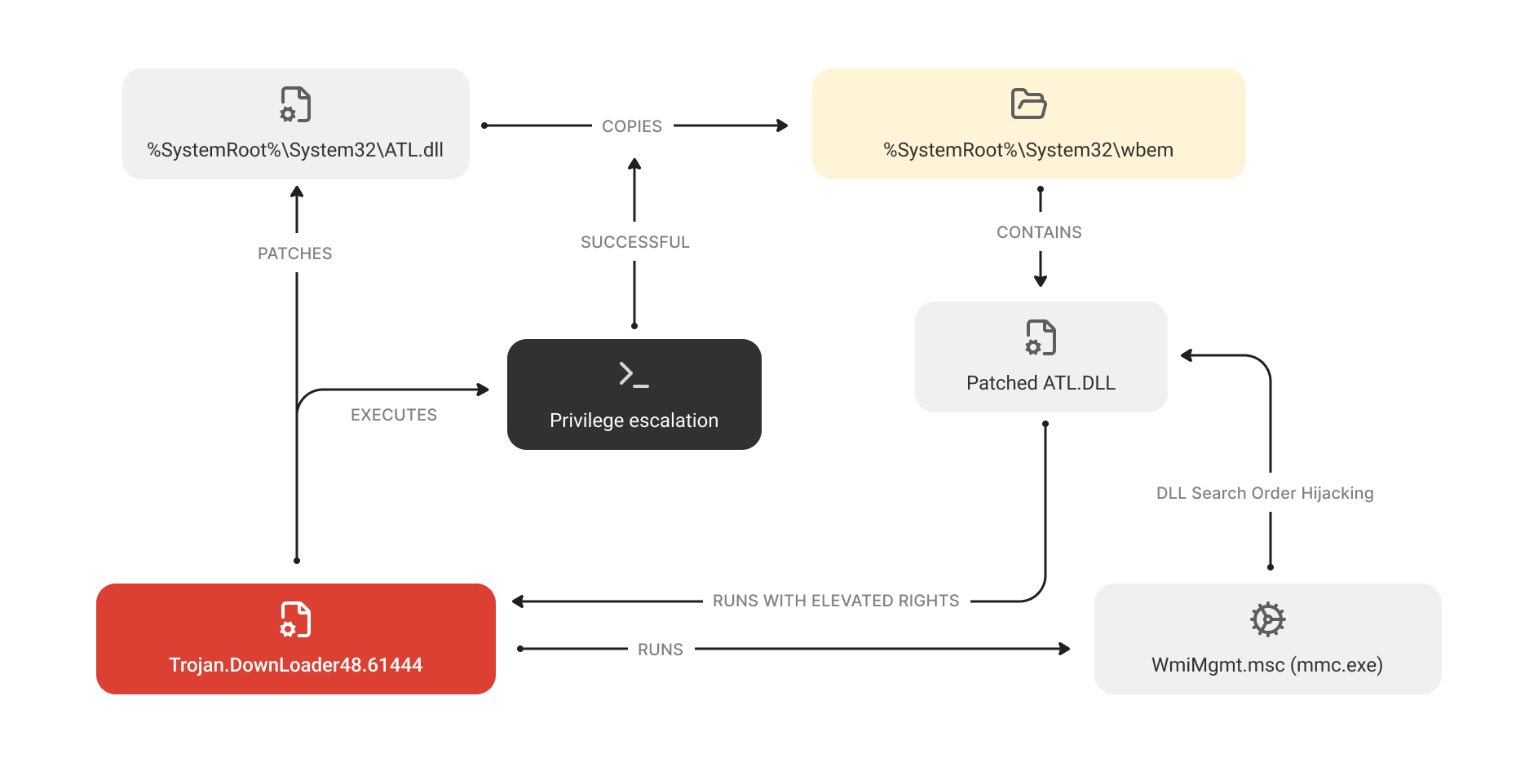
A scheme illustrating Trojan.DownLoader48.61444’s operation when administrator rights are not available
When running as administrator, Trojan.DownLoader48.61444 executes several PowerShell scripts for downloading the payload from the C2 server. One of the downloading objects is the ZIP archive one.zip. It contains the same files as in the archive onedrive.zip from the first infection chain (particularly, the legitimate app OneDrivePatcher.exe and the malicious library UpdateRingSettings.dll, which is Trojan.DownLoader48.54318).
Trojan.DownLoader48.61444 extracts the archive and creates a System Scheduler task for running OneDrivePatcher.exe at system boot. The trojan also launches this app. Just like in the first chain, a DLL Search Order Hijacking vulnerability is exploited in OneDrivePatcher.exe upon its launch, and the trojan library UpdateRingSettings.dll is automatically loaded. After that, the infection chain repeats the first scenario.
At the same time, Trojan.DownLoader48.61444 also downloads the second ZIP archive two.zip. It contains the malicious script Python.Downloader.208 (update.py) as well as the files necessary for its execution. Among them is Guardian.exe, which is a renamed pythonw.exe consol interpreter for the Python language.
After extracting the archive, Trojan.DownLoader48.61444 creates a System Scheduler task for launching Guardian.exe at system boot. Moreover, it directly executes the malicious script Python.Downloader.208 through this app.
By partially duplicating the first infection chain, threat actors apparently sought to increase the likelihood of successfully downloading Trojan.ChimeraWire onto target systems.
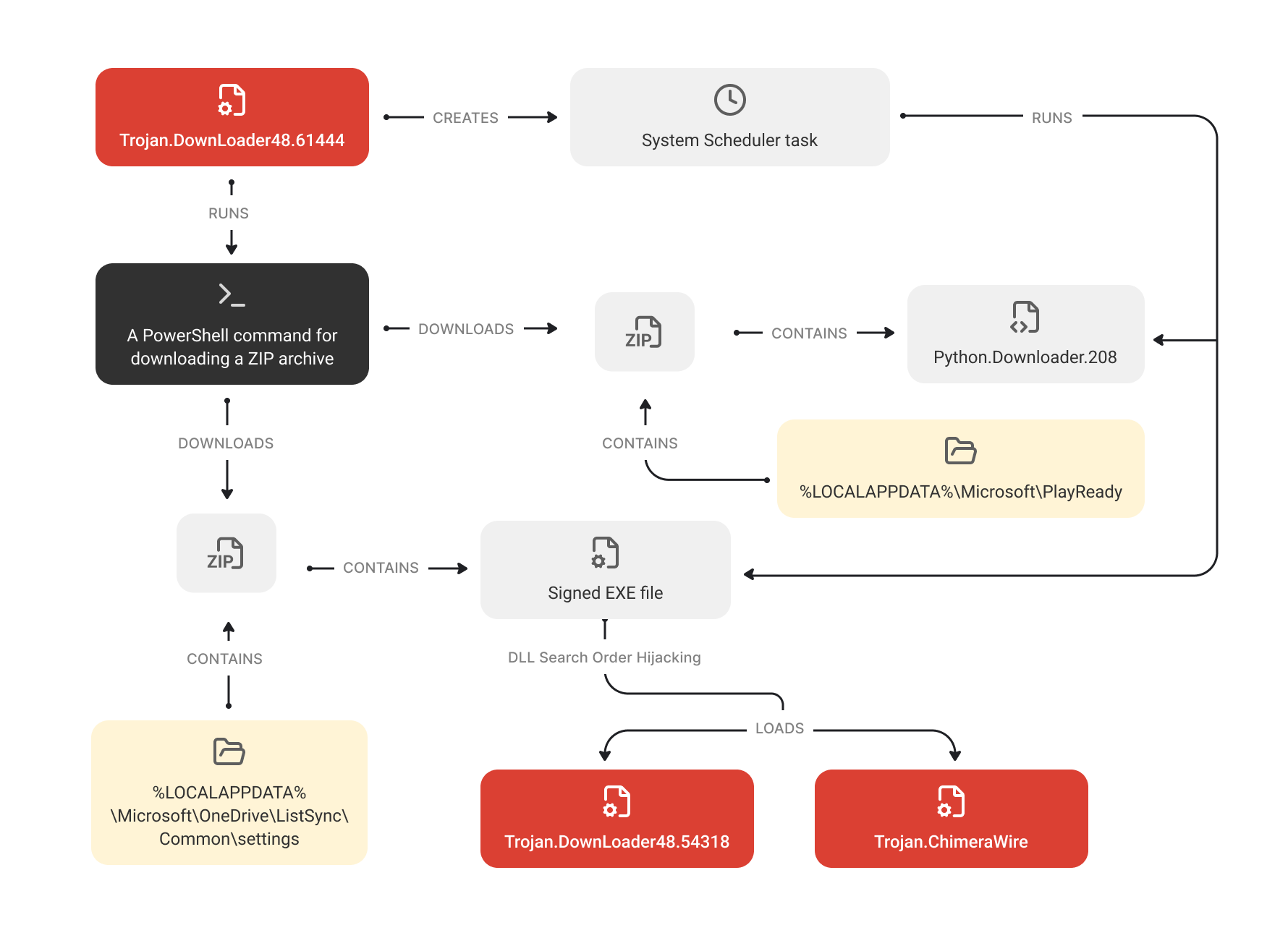
A scheme illustrating Trojan.DownLoader48.61444 operating with administrator rights
Trojan.ChimeraWire
Trojan.ChimeraWire got its name from combining the words “chimera”—a mythical creature with the body parts of several animals—and “wire”. The word "chimera” describes the hybrid nature of the attackers’ techniques: the use of trojan downloaders written in different programming languages as well as anti-debugging techniques and privilege escalation during the infection process. Moreover, it reflects the fact that the trojan is a combination of various frameworks, plugins, and legal software through which hidden traffic control is carried out. And this is where the second word “wire” comes from: it refers to the trojan’s invisible and malicious network operation.
Once on the target computer, Trojan.ChimeraWire downloads the archive chrome-win.zip from a third-party website. This archive contains the Google Chrome browser for Windows. It should be noted that this Internet resource also stores archives containing Google Chrome builds for other operating systems, like Linux and macOS, including those for various hardware platforms.
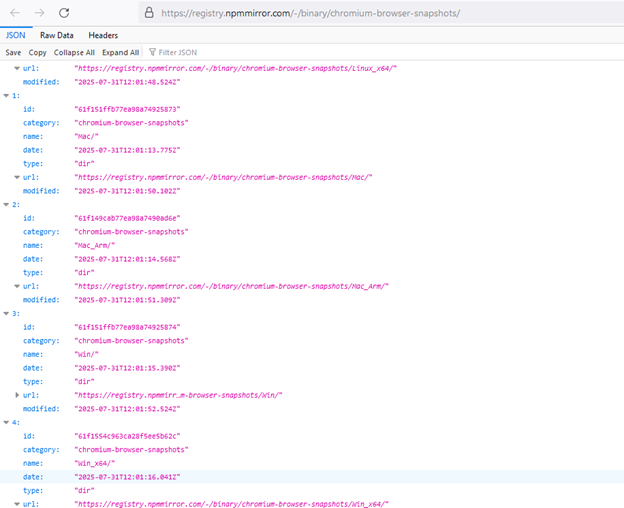
The website with various Google Chrome builds from which the trojan downloads the necessary archive
When the browser is downloaded, Trojan.ChimeraWire tries to covertly install the add-ons NopeCHA and Buster into it. Designed for automated CAPTCHA solving, these add-ons will be used by the malware further along in its operation.
Next, it launches the browser in the debugging mode with a hidden window, which allows malicious activity to occur without the user noticing. After that, a connection is established to the automatically selected debugging port via the WebSocket protocol.
The trojan then proceeds to obtain tasks. It sends a request to the C2 server and receives a base64 string in response. This string contains the JSON configuration encrypted with the AES-GCM algorithm.
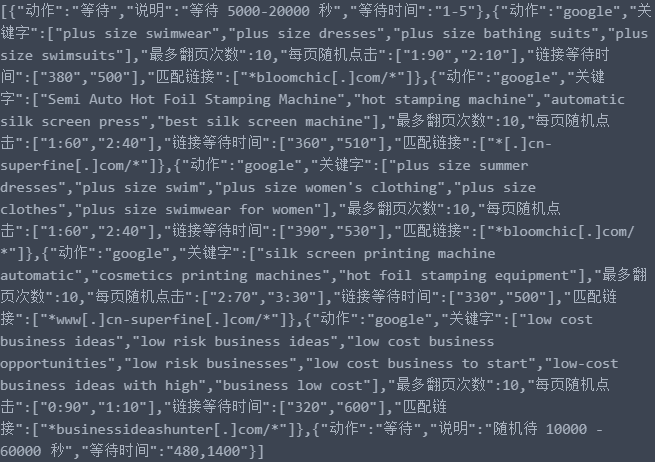
Example of the configuration that the trojan receives from the C2 server
It contains tasks and the parameters related to them:
- the target search engine (the Google and Bing search platforms are supported);
- the key phrases for searching websites in the target search engine and for their consequent loading;
- the maximum number of sequential transitions between webpages;
- random distributions for performing automated clicks on webpages;
- the wait time for loading pages;
- the target domains.
To more effectively simulate the activity of a real user and bypass systems that monitor constant activity, the configuration also includes parameters responsible for pauses between work sessions.
Simulating user mouse clicks
Trojan.ChimeraWire can perform the following types of clicks:
- for navigating search results;
- for opening found relevant links in new background tabs.
First, using the target search engine, Trojan.ChimeraWire searches websites by the domains and key phrases specified in the configuration. It then opens the websites listed in the search results and locates every HTML element on them that defines hyperlinks. The trojan puts these elements into a data array and shuffles it so that all of the objects in it are listed in a different order than the order on the webpage. This is to bypass website anti-bot protection that can track the order of clicks.
Next, Trojan.ChimeraWire checks whether the links it has found and the strings in them match the template from the configuration, and then calculates the number of matches. Depending on this number, the malware then uses different operating algorithms.
If a sufficient number of suitable links is found on the page, Trojan.ChimeraWire scans the page and sorts the detected links by their relevance (the links that most closely match key phrases are listed first). After that, a click is performed on one or multiple suitable links.
If the number of matches with the given template are insufficient or none exist, the malware uses a probabilistic behavior model algorithm that imitates real human behavior as closely as possible. Based on the parameters from the configuration, Trojan.ChimeraWire uses a weighted distribution to determine the number of links to be opened. For example, the distribution ["1:90", "2:10"] means that the trojan will click 1 link with a probability of 90% and 2 links with a probability of 20%. Thus, the malware is highly likely to open 1 link. The trojan randomly selects the link from the data array it created earlier and performs a click.
Every time the trojan opens a link from the search results and performs clicks on the loaded webpage, it either returns to the previous browser tab or proceeds to the next one, depending on the task. These actions are repeated until the click limit for the target websites is exhausted.
Below are examples of websites that the trojan was commanded to interact with in tasks received from the C2 server:



For detailed technical descriptions of the ChimeraWire trojan and the malware involved in its download, please refer to the PDF version of the study or visit the Doctor Web virus library.
More details about Trojan.ChimeraWire
More details about Trojan.DownLoader48.54600
More details about Trojan.Starter.8377
More details about Python.Downloader.208
More details about Trojan.DownLoader48.54318
More details about Trojan.DownLoader48.61444
Conclusion
As of now, Trojan.ChimeraWire's malicious activity essentially boils down to performing relatively simple clicker tasks to boost the popularity of websites. At the same time, the functionality of the tools that the trojan is based on allows it to perform a wider range of tasks, including automated actions under the guise of real user activity. For instance, malicious actors can utilize it to fill out web forms on various sites, including those conducting surveys for advertising purposes. In addition, they can use the trojan for reading the contents of webpages and taking screenshots of them — both for the purposes of cyber espionage and for automated data collection to build various databases (e.g., with emails, phone numbers, etc.).
Thus, we can expect new Trojan.ChimeraWire versions to emerge in the future, in which these and other features will be fully implemented. Doctor Web’s specialists continue to monitor the trojan’s evolution.
MITRE ATT&CK®
We analyzed Trojan.ChimeraWire using the MITRE ATT&CK® framework, a matrix describing the tactics and techniques that cybercriminals utilize to attack information systems. The following key techniques were identified:
| Stage | Technique |
|---|---|
| Execution | User Execution (T1204) Malicious File (T1204.002) Malicious Library (T1204.005) PowerShell (T1059.001) Windows Command Shell (T1059.003) Visual Basic (T1059.005) Python (T1059.006) Scheduled Task (T1053.005) |
| Persistence | Registry Run Keys / Startup Folder (T1547.001) Scheduled Task/Job (T1053) |
| Privilege Escalation | Hijack Execution Flow: DLL (T1574.001) Bypass User Account Control (T1548.002) |
| Defense Evasion | Encrypted/Encoded File (T1027.013) Debugger Evasion (T1622) Hidden Window (T1564.003) File/Path Exclusions (T1564.012) Deobfuscate/Decode Files or Information (T1140) Hijack Execution Flow: DLL (T1574.001) |
| Command and Control | Bidirectional Communication (T1102.002) Web Protocols (T1071.001) |